
Lifestyle
Here at Tips4U we'd like to give everyone some tips to help with their lifestyle.
The topic areas we'll cover here are things like:
- Good balance (balancing work with leisure)
- Personal Finance
- What to do for entertainment (any ideas we think might appeal to people in general)
- Fashion
- Car
- Motorcycles
- Entertainment
- Phones
- Family
Watch this space for more details coming soon
Work - Life Balance
Here at Tips4U we have the following tips for a good balance between work and leisure:
Schedule yourself some downtime
Make sure you plan some time during your weekly schedule for timeout to not be working, either in your job or jobs at home.
If you've got a night out of entertainment organised it will give you something to look forward to that week, be it a trip to watch a sporting event or taking in some live music at a local venue.
It helps to be proactive about this, so that it is a committed event of something you will look forward to.
Drop activites that seem more like a chore
Drop activities that may have seemed to have been a good idea when originally perceived but have become more of a pain than a pleasure now.
Be careful with this one as not every event can be as good as the last one, if you normally enjoy a night of playing darts with friends but you have a bad day and can't enjoy it one evening, don't give up on it just like that, make sure it's really run it's course (I can only stand being thrashed at darts and pool for so long).
Rethink your chores
Most of us have chores to do which can't be left forever, things like washing, ironing, cooking.
If you think you've got no time to yourself because you're always busy with one chore or another, consider whether you can outsource the work, eg:
- get some home help in for the ironing
- hire a gardener (or get one of the local neighbours kids to earn some pocket money mowing the lawns)
- use the click and collect or home delivery options for getting the weekly shop
- do your banking and pay bills online rather than trek to the bank each week
Get some exercise in
Exercising on your own or with friends can be both relaxing and stimulating. It can be a great way to unwind and let off any build up of stress from the everyday monotony of work and chores.
Swim, jog, walk, join a gym. Do whatever appeals to you and what you will enjoy.
Be realistic
Don't throw your life upside down if you really take on board these tips. Take things up gradually and don't go to the other extreme of all play and no work (or not so much work). It's all about balance, human nature is to have a working life to bring in money to support the life you want for yourself and your family. These tips are to make sure it's not "all work and no play". Get that balance right.
Personal Finance
Here at Tips4U we think taking the time to manage your money better can really pay off. It can help you stay on top of your bills and save thousands of pounds (or dollars) each year. You can use the extra savings you get to pay off any debts you might have, put them towards your pension, or spend them on your next big purchase, such as a car or holiday. Read on for money management tips, including how to set up a budget, sticking to it and how to save.
How to set up a budget
The first step to taking control of your finances is doing a budget. It will take some time and effort, but it'll be worth it and it’s a great way to get a quick snapshot of the money you have coming in and going out.
Setting up a budget means you’re:
- less likely to end up in debt
- less likely to get caught out by unexpected costs
- more likely to have a good credit rating
- more likely to be accepted for a mortgage or a loan
- able to spot areas where you can make savings
- in a good position to save up for a holiday, a new car, or another treat
What you need
To get started on your budget, you’ll need to work out how much you spend on:
- household bills
- living costs
- financial products (insurance…)
- family and friends (presents…)
- travel (car costs, public transport…)
- leisure (holidays, sport, restaurants…)
You can set a budget up using a spreadsheet or just write it all down on a piece of paper. There are also some great free budgeting apps available and your bank or building society may have an online budgeting tool which takes information directly from your transactions.
Keeping your budget on track
If you’re spending more than you have coming in, you need to work out where you can cut back.
This could be as easy as making your lunch at home, or cancelling a gym membership you don’t use.
You could also keep a spending diary and keep a note of everything you buy in a month. Or, if you do most of your spending with a bank card, have a look at last month’s bank statement and work out where your money is going.
Get everyone involved
Get everyone in your family involved with keeping to a budget. Sit down together and make a plan that you can all stick to. Work out how much spending money is available and agree between you what you’ll each have.
Cutting your household bills and your mortgage
For many of us, household bills make up a large chunk of our spending. The good news is that it’s easy to save hundreds of pounds off your bills by following our tips.
You can also save hundreds and even thousands of pounds by shopping around for a new mortgage, or reviewing the one you already have.
Be flexible
Life is unpredictable so try and review your budget and your spending if there’s a change, or at least every couple of months.
You may get a pay rise, which means you can save more, or you may find your household bills increase.
Paying off loans and credit cards
If you have loans or owe money on credit cards it usually makes sense to pay off the debt that charges the highest rate of interest first.
Examples include:
- store cards, which normally charge the highest rates of interest
- credit cards
- personal loans from the bank, which normally charge a lower rate of interest than credit or store cards
It is important to make sure you don’t break the terms of any of your agreements. So even if you’re focusing on paying down another debt, you must pay at least the minimum on any credit cards and your monthly required payments on any loan agreements.
Getting help if debt problems become serious
If you’ve already missed credit card or loan payments or if you’re behind with so-called ‘priority debts’ such as your rent or mortgage, energy bills, Council Tax, child support or court fines, take advice from a free debt advice charity straight away.
Set a savings goal
Some people find it hard to get motivated about saving, but it’s often much easier if you set a goal.
Your first step is to have some emergency savings – money to fall back on if you have an emergency, such as a boiler breakdown or if you can’t work for a while.
Try to get three months’ worth of expenses in an easy or instant access savings account. Don’t worry if you can’t save this straight away, but keep it as a target to aim for.
The best way to save money is to pay some money into a savings account every month.
Once you’ve set aside your emergency fund, possible savings goals to consider might include:
- taking a holiday without having to worry about the bills when you get back
- having some extra money to draw on while you’re on maternity or paternity leave
- buying a car without taking out a loan
Investing your savings
As your savings start to grow, you can:
- Put more money into your pension. It’s a great way to make sure you’ll be able to live more comfortably later in life.
- Make an investment plan based on your goals and timeframes.
If you’re overwhelmed by your debts
Often, the hardest part of paying off your debts is taking the first step.
It’s easy to feel overwhelmed if you know you’re struggling financially. It’s tempting to bury your head in the sand and ignore your bank statements and demands for payment, but it won’t make the problem any better and could make it worse.
So, take a deep breath and open any letters you’ve been ignoring.
Once you’ve done this, at least you’ll know what you have to deal with and you can work out what you need to do next.
Motorcycles
Here at Tips4U we think riding a motorcycle is one of the most exhilarating things you can do. You don't have to be speeding tremendously fast to experience the thrill, even at slow speeds riding a bike will put a huge smile on your face.
Once you pass your full motorcycle test the options of what motorcycle you can ride are unlimited. The initial challenge you will have is which motorcycle is best for you as an individual. Here are some tips we found to be really useful.
Tips4U - Choosing a motorcycle.
Choosing which motorcycle that is right for you can be very difficult, with so many different sizes and styles to choose from. In fact we believe that many motorcycle enthusiasts feel that one simply isn’t enough.
Once you have decided that it’s time to purchase a motorcycle you need to answer some questions before going shopping. It’s important that you answer these questions honestly to avoid choosing a motorcycle that you won’t be happy with once you’ve made your purchase.
Here are the questions you should be asking yourself.
- What is my riding experience? Beginner, ride occasionally or experienced.
- What type of riding will I be doing primarily? Commuting, long distance touring, around town, carving corners, etc.
- What type of roads will I be riding on primarily? City streets, highway, some off-road, back roads, etc.
- How far will my average ride be? Short commutes, long, daily commutes, long distance touring, weekend trips, etc.
- Will I be using the motorcycle for daily commuting or just for weekend or occasional rides?
- Will I be riding all year or just during good weather?
- Will I be looking for a new or pre-owned motorcycle?
- Am I looking for a motorcycle that appeals to my heart or my brain?
Once you have answered these questions you can go on to the next step, which is identifying a style of motorcycle that fits your experience and riding needs.
The 5 main styles
There are many different types of motorcycles available, however they can be broken down into five basic styles.
Standard or Naked
Cruiser
Touring
Sport
Dual Purpose / Adventure Touring
Standard or Naked Motorcycle
The standard or naked motorcycle is one that puts the rider in an upright position and doesn’t have a fairing to deflect wind. They are available in a variety of engine sizes and are easy to ride and maneuverable. While they can be ridden on most roads, the rider may find the lack of wind protection uncomfortable or tiring at speed over long periods of time.
This style of motorcycle is ideally suited for city streets and winding roads that may or may not be smooth. The standard or naked motorcycle is a great choice for someone who wants a daily commuter that they can have fun with on the weekend.

Cruiser Motorcycle
The cruiser is a motorcycle that puts the rider in a relaxed or more reclined position. While many manufacturers produce cruisers, Harley Davidson is the most recognizable producer of this style of motorcycle. While you can find cruiser motorcycles in all engine sizes, most are 1000 cc’s or larger. The cruiser is not known for maneuverability, but they are comfortable for long rides. With the addition of a windshield and luggage this style of motorcycle can be used for touring.

Touring Motorcycle
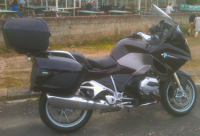
The touring motorcycle is one that is designed for travelling long distances in comfort. Touring motorcycles have large size engines and have the fuel and luggage capacity to put on plenty of miles without stopping too often. They have a fairing or windshield to provide protection for the rider and can be equipped with sound and entertainment systems along with plug-in ports for heated rider apparel. All this hauling capacity and comfort comes at a price, both in money and weight. A fully outfitted tourer can cost as much as a mid-sized car and can easily weigh over 800 pounds.
Sports Motorcycle
A sports motorcycle is essentially a street legal version of a competition road racing motorcycle. They place the rider in a forward leaning position and are built for speed and maneuverability at the expense of comfort. These motorcycles, at least in the models that are 600cc’s or higher are best suited for expert riders.

Dual Purpose / Adventure Touring Motorcycle
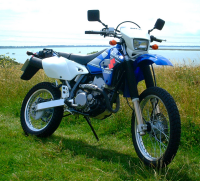
Dual purpose and adventure touring motorcycles are perhaps the most versatile motorcycles available. They put the rider in an upright position and are designed to manage a variety of road conditions from highway to dirt. Motorcycles in this category range from dirt focused to world travel.
Entertainment
Bluetooth Speakers
Here at Tips4U we've had a variety of Bluetooth speakers for a few years now. But recently, as at spring of 2023, we got interested in a few more that we thought we might add to our collection.
Tips4U - Bluetooth Speakers Tiny to Massive.
Bluetooth speakers have been around for a few years now and probably grew in popularity because of the freedom from wires and their lightweight portability. And who hasn't got a mobile phone now with Bluetooth capabilities, and either music on the phone, or accessible through Youtube or Soundcloud or wherever.
Another thing that has moved on over the years is battery technology. The battery life on Bluetooth speakers is very impressive nowadays, with claims of up to 20 hours of usage between charges being quite commonplace.
We recently got another Bluetooth speaker that caught our eye in a sale (March 2023). This got us further interested in what other Bluetooth speakers are available now. We put together a video to show what we've got and what they're good for.
Phones
iPhone Tips
Here we have a few of our favourite Tips4U for the iPhone. We recently upgraded our iPhone from an iPhone 3GS to an iPhone 5 (as at January 2016), this meant we could upgrade the operating system to iOS10. The newer operating systems certainly seem to have a few good tricks up their sleeve.
- GET BACK TO THE TOP OF A PAGE
Get back to the top of a page by touching the status bar (ie where the Time and the Battery Life are at the very top of the page). If you're on a web page you have to press twice, the first time highlights the address bar then the next press takes you to the top of the page. - ANOTHER BUTTON TO TAKE PICTURES
Use the "volume up" physical button as the shutter button for taking pictures. Depending on how you are holding the phone, this can be useful to get a steadier shot. - NEED TO QUICKLY GET TO THE CAMERA FOR A PHOTO OPPORTUNITY
Get to the camera by swiping right even when the phone is locked. - QUICK ACCESS TO CONTROL CENTRE
Get to the Control Centre (where some useful stuff is) by swiping up starting the swipe below the screen. - SCREEN SHOT
To take a screen shot hold the top button and quickly press the home button. The picture will be saved to your camera roll. - FINDING TEXT
Do a "Find" on a web page by typing the word you want to find into the address bar, then scroll down the options and you'll get to the "Find" on this page option. - SEE WHICH APPS DRAIN THE MOST BATTERY
Want to know why your iPhone battery is draining faster than usual? Head over to Settings >Battery >Battery Usage. This will tell you which apps are using the most battery power. We found this is more of a usage of what apps have been used than actually helping with any analysis of what apps might be causing excessive battery drain. Useful all the same though. - LET YOUR FRIENDS TRACK WHERE YOU GO
.If you want your friends or a family member to be able to track you as you move, you can individuals up to be able to see where you are. Press the "i" icon near the top tight of the screen when you gave an text conversation window open. Press the "Share My Location". You can choose to share your location for one hour, until the end of the day, or indefinitely. - SAVE BATTERY BY PUTTING YOUR PHONE IN GRAYSCALE MODE
If you're running low on juice and just need basic functionality from your iPhone, try switching it to grayscale mode to save power. Just head to Settings>General>Accessibility and tap "Grayscale". - USE LOW POWER MODE TO MAKE YOUR PHONE LAST LONGER
Low Power Mode, which has been a new addition since iOS 9, tells your iPhone to cut down on certain features to lengthen its battery life. This means it’ll stop refreshing apps in the background, pushing email, and other tiny things in order to keep your battery going. - SEARCH FOR ANYTHING IN THE SETTINGS MENU
You no longer have to dig through the iPhone’s settings menu to find what you’re looking for. If your iPhone is updated to at least iOS 9, you’ll notice there’s a search bar at the top of the settings menu that helps you quickly jump to any given setting. - CHANGE VIDEO RECORDING RESOLUTION
Since the iPhone 6s and iPhone 6s Plus there is 4K video recording on an Apple handset, a resolution that can take up a serious amount of your phone’s internal storage. To help head off potential problems, iOS 9 onwards includes a video resolution selector which you can use on any device (not just the new iPhones): go to Settings, then Photos & Camera, then Record Video to set your preference. On devices where the slow-motion video feature is supported you can set the video resolution for this as well. - CREATE A LONGER PASSCODE
The longer your passcode, the harder it is to crack, from iOS 9 onwards the new default length is six digits rather than four. If you already have a four-digit PIN in place, go into the Passcode section of Settings and tap on Passcode — you’ll then be prompted for a new code that’s six digits long. Even though Touch ID replaces the passcode in many situations, there are still times when iOS relies on it (when restarting your device for example). - ALLOW SELECTED CONTACTS TO BYPASS DO NOT DISTURB
The VIP system for allowing selected contacts to still call you has been improved dramatically in iOS 10. Now you can pick out contacts that can make your phone ring individually. Go into Contacts, select a contact, click Edit, and then you can set the ringtone and text tone to Emergency Bypass On. - READ WEBSITES MORE EASILY
Stop struggling to read overcrowded Web pages on the iPhone's small screen. Instead, tap the Reader button, found in the top left of the URL bar at the top of a Web page, and you'll see a much clearer, predominantly text version of the page. Even better: This view hides advertisements. It doesn't work with all websites.